Your 5 GHz network ran smoothly all morning. Then, without warning, several access points jumped to new channels. Voice calls dropped for a few seconds, and nobody touched a setting. In many cases, the cause is Dynamic Frequency Selection, better known as DFS. Most IT teams have seen the DFS checkbox in a controller. However, few teams know what it does or why it matters. In this post, we explain 5 GHz DFS channels in plain language for Canadian IT teams.
What DFS Channels Are
Radar systems share parts of the 5 GHz band with Wi-Fi. Specifically, weather radar, airport radar and some military systems operate there. For this reason, regulators require Wi-Fi equipment to listen for radar before and during use. In Canada, Innovation, Science and Economic Development Canada sets these rules. The channels that carry this requirement are known as DFS channels.
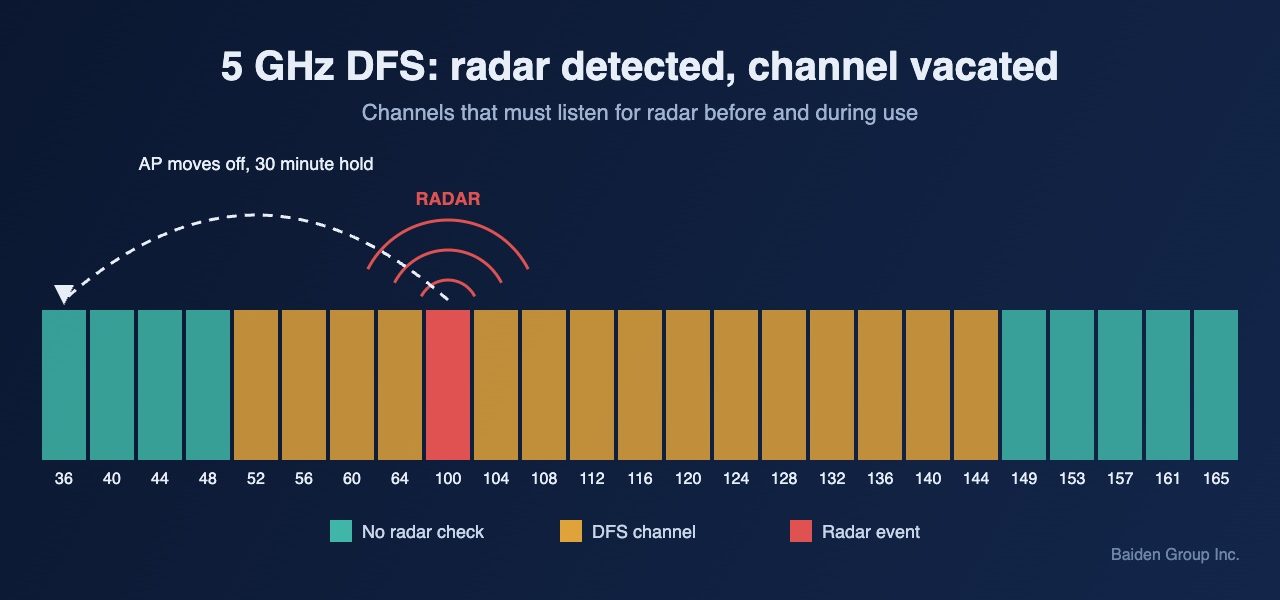
Generally, they include channels 52 to 64 and channels 100 to 144. In contrast, channels 36 to 48 and 149 to 165 do not require radar detection. Notably, that leaves only nine 20 MHz channels outside DFS. As a result, most enterprise channel plans depend on DFS channels to work at all.
What Happens When an Access Point Detects Radar
Before an access point can use a DFS channel, it must listen for at least 60 seconds. This step is the channel availability check. During that minute, the radio cannot serve clients on that channel. Moreover, if the access point detects radar later, it must leave the channel quickly. It then cannot return to that channel for 30 minutes.
In practice, clients on that radio lose their connection and must find a new one. Voice and video sessions usually feel this first. In addition, false detections are common. Some access points mistake ordinary noise for a radar pulse. Consequently, a network can log radar events even when no radar is nearby. Meanwhile, sites near airports, ports or weather radar stations may see real events every day.
Why Client Devices Struggle on DFS Channels
Client support is the second issue. Some older laptops, scanners and IoT devices do not support DFS channels at all. Those devices simply cannot see an access point on channel 100. Furthermore, clients cannot send probe requests on a DFS channel until they hear a beacon. They must wait and listen instead. As a result, scanning takes longer and roaming can slow down. For example, a handheld scanner may stay on a weak access point because it never found the better one.
How to Manage DFS on an Enterprise Network
Disabling DFS entirely is rarely the right answer. Indeed, doing so removes more than half of your 5 GHz channels. Instead, start with your controller or cloud dashboard logs. Look for radar detection events and note which channels and access points report them. Next, check whether the events cluster in one area or at one time of day.
With that in mind, remove only the channels that trigger repeated events. Additionally, confirm that every critical client device supports the DFS channels in your plan. Device spec sheets often list this under supported channels or regulatory domain. Also, keep voice and other real time traffic on channels that see few events. Finally, verify the results with a site survey that includes spectrum analysis. A survey shows what is actually in the air, not what the dashboard assumes.
Making DFS Work for You
Ultimately, DFS is a regulatory requirement, not a defect. Handled well, it gives you the channels you need for a clean 5 GHz design. When it is handled poorly, it creates random disconnects that are hard to trace. At Baiden Group, we review DFS behaviour as part of every Wi-Fi design, RF site survey and troubleshooting engagement. Our managed Wi-Fi clients also get ongoing monitoring of radar events and channel changes.
Have questions about how these developments affect your network? Reach out to the Baiden Group team.