The call came on a Tuesday. A regional hospital in Ontario had a wing where staff phones dropped calls every afternoon. However, the wireless controller showed nothing wrong. Every access point was online, and every dashboard was green. Therefore, the IT team had spent three weeks replacing cables and rebooting switches. I was asked to find what the dashboards could not show. This is what I found, and what it taught me about hospital Wi-Fi troubleshooting.
Start With the Pattern, Not the Equipment
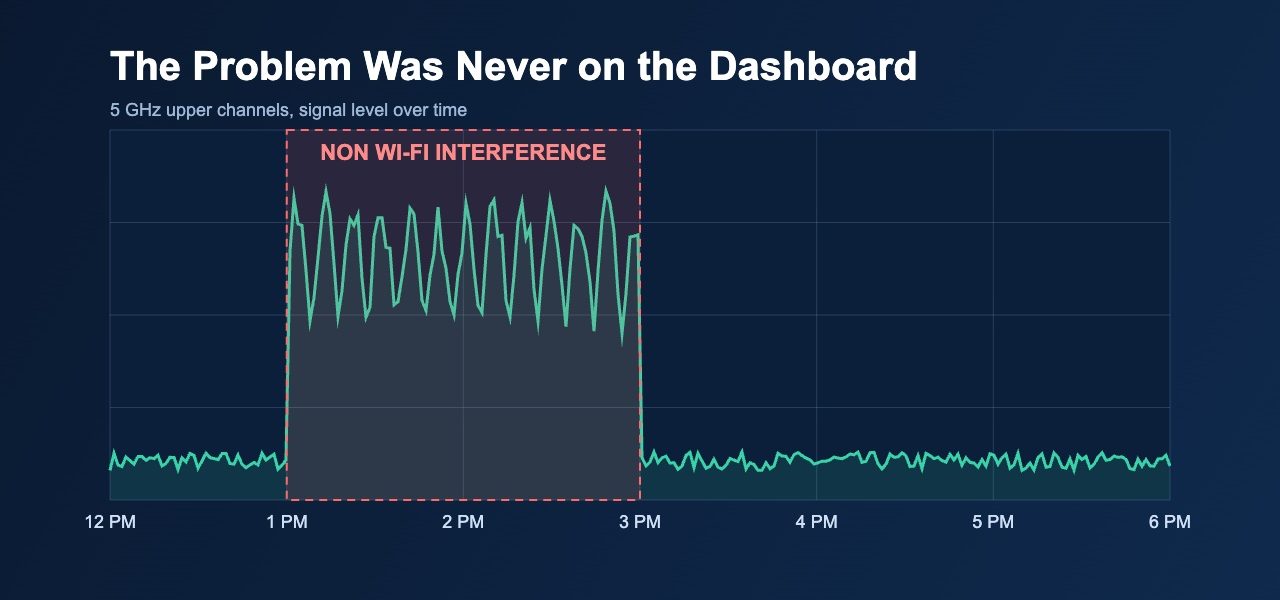
First, I asked when the drops happened. The answer was between one and three in the afternoon, on weekdays only. Notably, nothing in the network changed at that hour. No backups ran, and no firmware jobs were scheduled. That told me the cause probably sat outside the network.
Many teams skip this step. As a result, they chase controller settings for weeks. A problem tied to the clock almost always points to a physical source. Specifically, I look for something that starts and stops on a schedule. Instead of logging into the controller, I walked the wing with a spectrum analyzer at 12:45 and waited. Timing also shapes the tools you choose. A controller shows retries and signal strength. A spectrum analyzer shows everything else in the band.
What the Spectrum Showed
At 12:45 the 5 GHz band looked clean. At 1:10 the picture changed. A strong, narrow signal appeared on the upper channels and pulsed every few seconds. It was not Wi-Fi at all. Consequently, the access points kept retrying frames that never got through. The phones noticed first because voice traffic cannot wait.
I followed the signal to a window on the north side of the wing. Across the street, a construction crew had set up a temporary wireless link to feed a crane camera back to their site trailer. The link ran during afternoon concrete pours. Nobody at the hospital knew it existed. Likewise, the contractor had no idea it overlapped with a clinical network.
This kind of interference is easy to miss. Wi-Fi tools only measure Wi-Fi. Therefore, a standard controller report would never have flagged it. Additionally, the signal vanished by 3:30, so a walk at any other hour found nothing. Only a spectrum view at the right moment exposed it.
The Fix and the Lesson
We met with the site manager the next morning. Together, we moved the link to a different channel and lowered its power. Meanwhile, I re-planned the channels on the affected wing. I also kept voice devices off the upper channels that shared space with the new neighbour. Within a day, the dropped calls stopped.
That said, the real value came afterward. The hospital added a short spectrum check to its quarterly review. In addition, the IT team now asks for notice when neighbouring sites install wireless equipment. For example, they added a line to their facilities checklist. It costs nothing, and it would have saved three weeks.
The lesson is simple. Dashboards report what your access points can see. However, they cannot show what lives outside Wi-Fi. For this reason, I carry a spectrum analyzer to every troubleshooting visit. Moreover, I ask about timing before I touch a single setting. Most stubborn problems have a pattern, and the pattern usually points to the cause.
Canadian IT teams face this more often than they expect. Hospitals sit near construction, other clinics, and busy roads. Furthermore, dense buildings mean every wireless device competes for the same airtime. Overall, a good RF site survey and regular validation catch these issues early. Baiden Group provides Wi-Fi design, RF site surveys, troubleshooting, and managed Wi-Fi for organizations that cannot afford dropped calls.
Have questions about how these developments affect your network? Reach out to the Baiden Group team.