Most Wi-Fi complaints I see trace back to one stubborn group of devices. Legacy Wi-Fi devices rarely fail on their own. However, they shape how the entire network behaves. In this post, I share general field observations on why older clients matter and what Canadian IT teams can do about them.
Why Old Devices Set the Pace
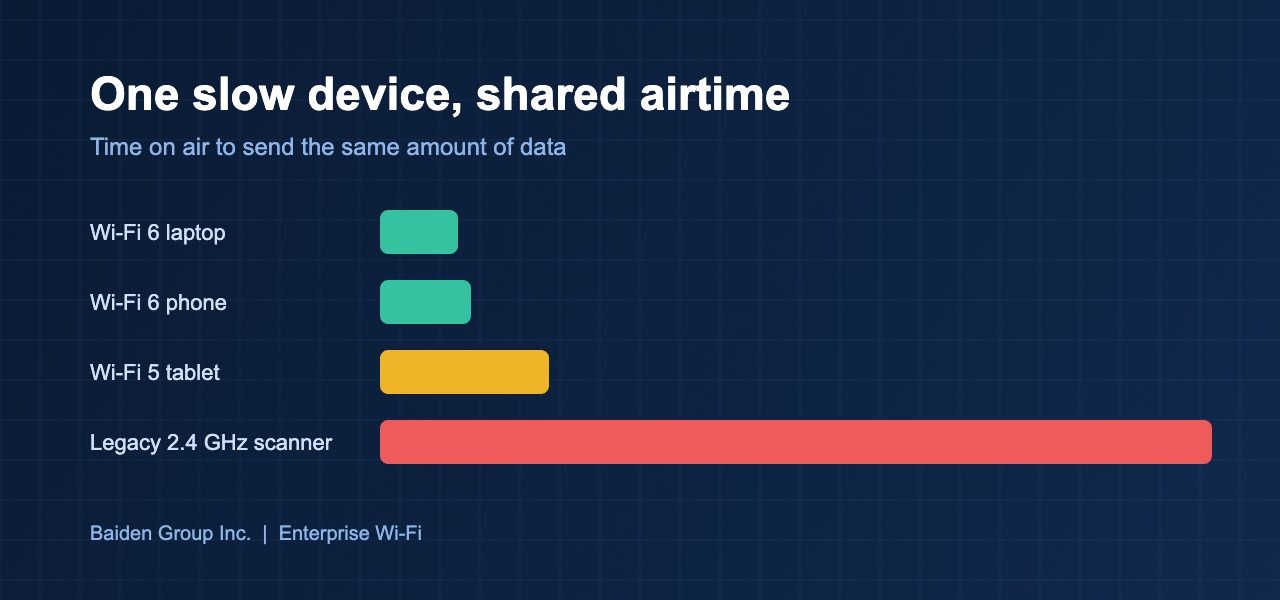
Wi-Fi is a shared medium. Every device takes turns to transmit. A slow device needs more airtime to send the same amount of data. As a result, one old handheld scanner can use the time that ten modern laptops would have used.
For example, a client that supports only 2.4 GHz and older data rates forces the access point to slow down its own transmissions. Therefore, everyone in that cell pays the price. Indeed, this is why a network can test well with a laptop and still feel poor to staff on the floor.
In practice, the survey laptop is rarely the problem device. Always test with the clients your users actually carry. Otherwise, the results describe a network nobody uses.
Where Legacy Devices Hide
Typically, they hide in plain sight. Barcode scanners, label printers, medical carts, badge readers, and building controls often stay in service for a decade. Meanwhile, nobody owns their wireless settings. Facilities buys them, and IT inherits them.
Moreover, many of these devices lack modern security. Some cannot use WPA3. Others cannot join a 6 GHz network at all. Consequently, teams keep older SSIDs alive long after their useful life ends.
Notably, a simple client inventory usually surprises people. I rarely visit a site where IT can name every device type on the air. That gap is where most surprises start.
What I Recommend
First, build an inventory from the controller. Group clients by band, security mode, and supported data rates. Next, give legacy devices their own SSID so they do not hold back everything else. Additionally, review your minimum data rates. Raising them removes the slowest transmissions, but confirm that critical devices still connect before you change anything.
Then check roaming behaviour for the devices that move. Handhelds and carts often hold on to a distant access point for too long. For this reason, test them while walking the real routes, not while standing still. Finally, set a replacement date. A device that cannot support current security is a risk, not just a nuisance.
Security deserves its own mention. A legacy SSID should never share a network segment with sensitive systems. Instead, place those devices in a restricted VLAN with tight firewall rules. Similarly, limit what they can reach to the few servers they truly need. If a vendor will not patch a device, this segmentation becomes your main protection. In short, you can keep old hardware running without letting it expose the rest of the network.
Plan the Retirement
Budget is the real barrier. Therefore, tie replacement to the lifecycle you already track. When a device comes due for refresh, specify Wi-Fi 6 or newer and WPA3 support in the purchase order. Over a few years, the legacy pool shrinks without a dedicated project.
Ultimately, the goal is not a perfect network. It is a network where the slowest device is a known quantity. That makes every design decision easier, from channel plans to capacity targets.
At Baiden Group, we help Canadian organizations with Wi-Fi design, RF site surveys, troubleshooting, and managed Wi-Fi. Our surveys include real client testing, so the results reflect how your people actually work. With that in mind, an inventory of your older devices is a good first step before any refresh.
Have questions about how these developments affect your network? Reach out to the Baiden Group team.