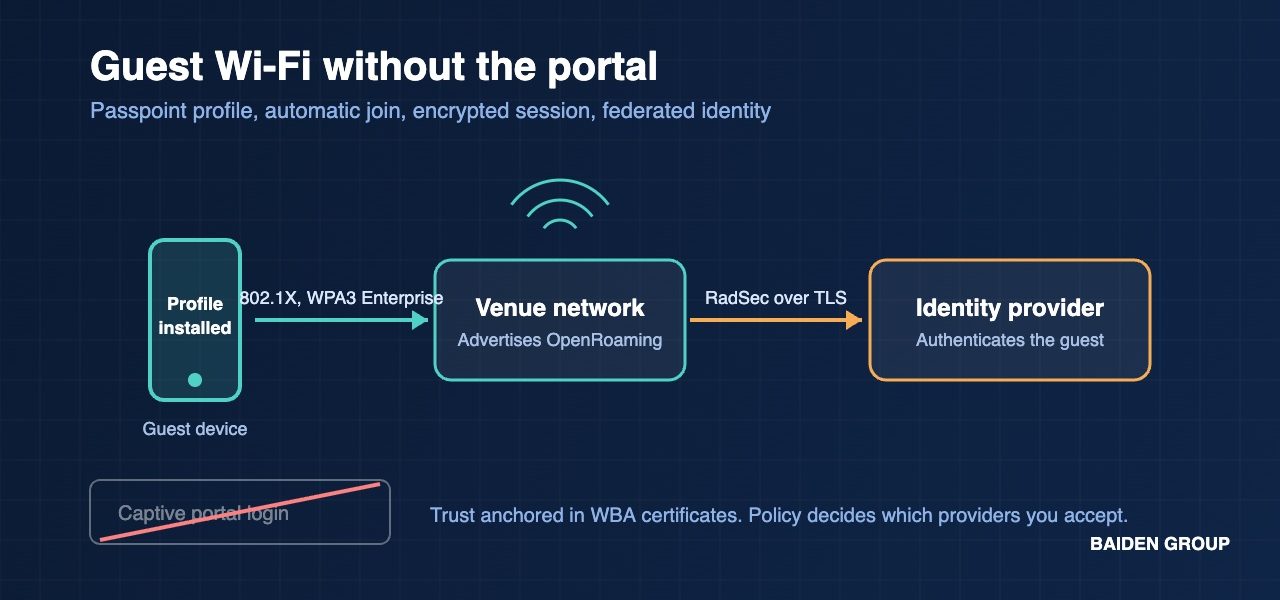
Most enterprise guest Wi-Fi still works the same way it did ten years ago. A visitor finds the network, opens a browser and fights a captive portal. OpenRoaming guest Wi-Fi promises to remove that step entirely. However, the technology is more than a convenience feature. It changes how authentication, privacy and liability work on your network. Canadian IT teams should understand those changes before a vendor turns it on with a single checkbox.
What OpenRoaming actually does
OpenRoaming is a federation run by the Wireless Broadband Alliance. It sits on top of Passpoint, the Wi-Fi Alliance certification also known as Hotspot 2.0. In practice, a phone carries a profile from an identity provider. That provider might be a carrier, a device maker, an app or a cloud identity service. When the phone sees a network that advertises OpenRoaming, it joins automatically using 802.1X and WPA2 or WPA3 Enterprise encryption.
Behind the scenes, your network does not hold the guest’s credentials. Instead, it finds the identity provider through DNS and talks to it over RADIUS secured with TLS, often called RadSec. Certificates issued under the WBA public key infrastructure establish trust between both sides. As a result, the guest gets an encrypted connection without a password, a portal or a click.
The specification is also maturing in public. Notably, the WBA has published OpenRoaming as an IETF Internet Draft, with a revision dated June 2026. That matters for procurement, because it gives buyers a documented reference instead of a vendor brochure.
What vendors claim versus what you get
Vendors describe OpenRoaming as seamless, secure guest access everywhere. Partly, that is accurate. Each guest session is encrypted over the air, which an open captive portal network never offers. Similarly, the automatic join removes the support calls that portals generate on phones and tablets.
That said, several claims need a closer look. First, the experience depends on the guest’s device carrying a usable profile. Many phones support Passpoint, but a profile still has to be installed through an app, an operating system service or a carrier. Consequently, some visitors will still need a fallback path on day one.
Second, “everywhere” depends on policy you configure. OpenRoaming networks advertise which identity providers and policies they accept. For example, a venue can accept only free identity providers, or it can join settled arrangements where money changes hands. Those choices affect who can connect and what you might owe or earn.
Third, the identity question deserves attention. Furthermore, OpenRoaming supports anonymous identities, so you may not learn who the guest is. For some organizations that is a privacy win. For others, such as a hospital or a government office, it raises questions about acceptable use, logging and incident response.
What this means for Canadian IT teams
Start with the business case rather than the feature list. In fact, OpenRoaming delivers the most value where many unmanaged devices visit briefly and often. Hospitals, airports, campuses, arenas and retail sites fit that pattern. Meanwhile, a small corporate office with a handful of visitors may gain little.
Next, review privacy obligations. Under PIPEDA and provincial privacy rules, any data you exchange with identity providers needs a clear purpose. Therefore, ask the vendor exactly which attributes cross the federation. Also, confirm where the RADIUS proxy and its logs physically live.
Then, check the RF and capacity side. Specifically, automatic join means more devices connect without anyone deciding to. A guest network that used to see a fraction of visitors may suddenly carry most of them. As a result, airtime planning, DHCP scope sizes and upstream bandwidth all need a fresh look before launch.
Finally, plan the coexistence period. In practice, you will likely run OpenRoaming beside an existing portal for some time. Additionally, test the most common phones and laptops your visitors actually carry. Moreover, document how the help desk should respond when a device joins the wrong network or none at all.
Questions to ask before you enable it
Ask which identity providers your configuration will accept, and why. Ask whether your platform supports WPA3 Enterprise for these sessions. Also ask how certificates are renewed, and who is alerted when one is about to expire. Importantly, ask what happens to guest access if the RadSec path to the federation fails.
Ultimately, OpenRoaming is a sound direction for guest access. Nevertheless, it moves complexity from the portal into authentication, policy and capacity. Baiden Group helps organizations across Canada plan that shift properly. Our team handles Wi-Fi design, RF site surveys, troubleshooting and managed Wi-Fi, so guest access works on the day you switch it on.
Have questions about how these developments affect your network? Reach out to the Baiden Group team.