Many IT teams add access points when users complain about slow Wi-Fi. However, more radios often make the problem worse. The real cause is usually poor Wi-Fi channel planning, not a lack of coverage. This post explains the basics in plain terms.
Airtime Is the Real Limit
A channel is a slice of radio spectrum that nearby devices share. Only one device can transmit on a channel at a time within earshot of the others. For example, a conference room with forty laptops behaves like a single phone line with forty callers. Therefore, airtime is the real currency of Wi-Fi, not signal bars.
The 2.4 GHz band offers three usable non overlapping channels in Canada. Those are channels 1, 6, and 11. In contrast, the 5 GHz band offers many more. Additionally, the 6 GHz band adds a large block of clean spectrum for Wi-Fi 6E and Wi-Fi 7 devices. Still, spectrum is finite, and every design must budget it carefully.
What Same Channel Interference Does
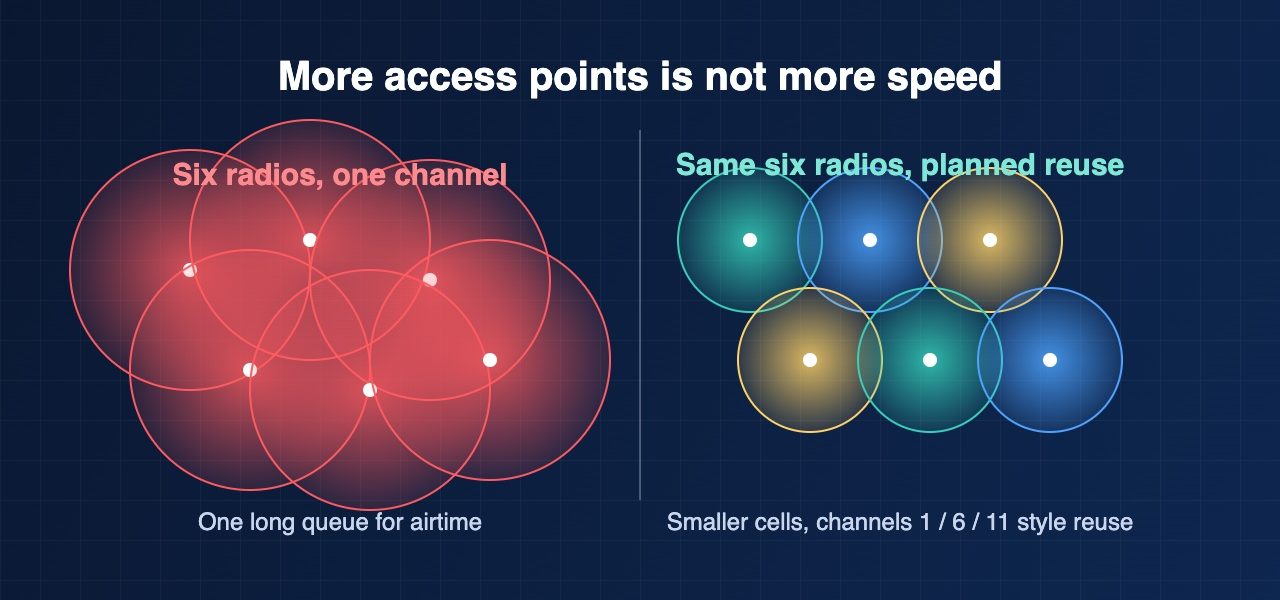
Same channel interference happens when two access points hear each other on one channel. They do not fight. Instead, they politely take turns. As a result, each access point gets only a share of the airtime. In practice, six access points on one channel behave like a single access point with a very long queue.
A common pattern on site looks like this. A site has dead spots, so someone doubles the access point count. Meanwhile, every new radio runs at full power on the same few channels. Throughput then falls instead of rising. Users blame the wireless, and the ticket count grows. Meanwhile, the design itself is the problem. Fewer radios with sensible power settings would serve those users better.
Auto channel features can help, but they have limits. A controller only sees what its own radios hear. Consequently, it cannot account for neighbouring tenants, handheld hotspots, or a noisy microwave in the break room.
SNR Matters More Than Signal Strength
RSSI tells you how loud the access point is. SNR tells you how loud it is compared with the background noise. For instance, a signal of minus 60 dBm with a noise floor of minus 95 dBm gives an SNR of 35 dB. That is healthy. Conversely, the same signal with a noise floor of minus 75 dBm gives only 15 dB.
Devices react to a low SNR by dropping to slower data rates. Slower rates then consume more airtime for the same amount of data. Notably, this hurts every other device on the channel, not just the weak client. Most voice and video applications need an SNR of at least 25 dB. Therefore, design to SNR first and signal strength second.
What to Do About It
Start with a written channel plan. Specifically, use 20 MHz channels in dense enterprise spaces. Wider channels look fast on a spec sheet. However, they leave fewer channels to reuse across a floor.
Next, lower transmit power so each cell shrinks. Smaller cells let you reuse the same channel farther apart. Also, disable the lowest data rates so distant clients roam sooner instead of clinging to a weak access point. Finally, validate the result with a post installation survey rather than trusting the dashboard alone.
How Baiden Group Can Help
Baiden Group helps Canadian organizations with Wi-Fi design, RF site surveys, troubleshooting, and managed Wi-Fi. A proper survey shows where channels overlap before they cost you productivity. Our team can review your current channel plan and recommend practical fixes. In many cases, the best improvement comes from removing or retuning radios rather than buying new ones.
Have questions about how these developments affect your network? Reach out to the Baiden Group team.