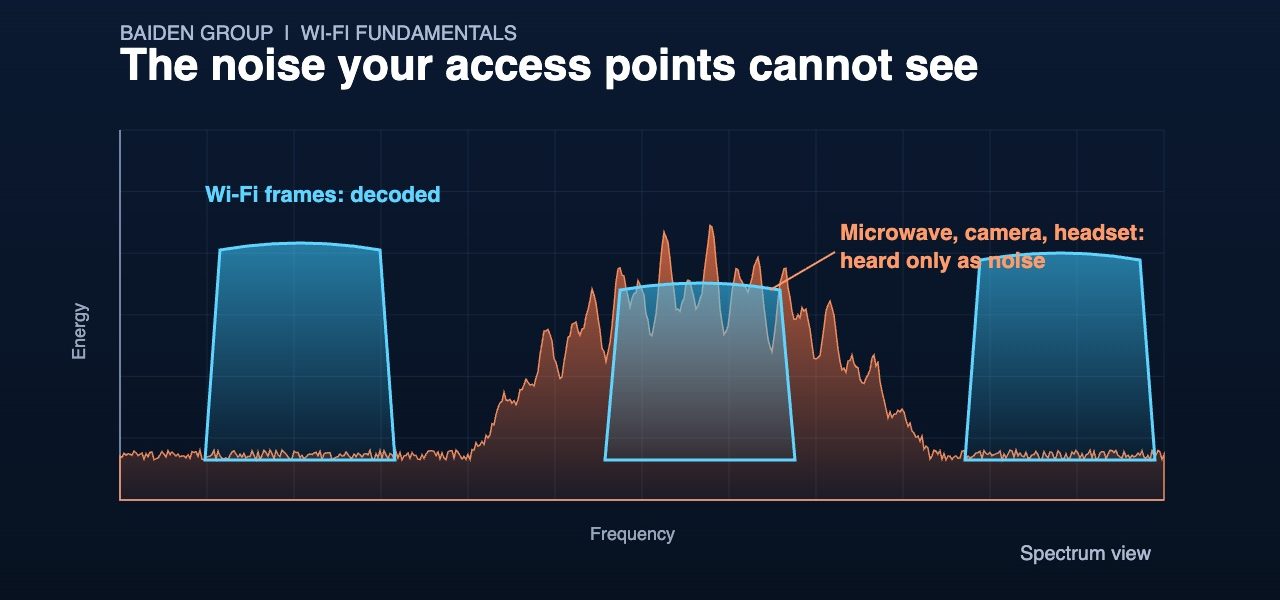
Most Wi-Fi complaints get blamed on the access points. However, some of the worst problems come from devices that never join the network at all. Microwave ovens, wireless cameras, Bluetooth headsets and old cordless phones all share the same unlicensed spectrum. Your access points hear their energy as noise. Yet the controller dashboard rarely tells you where it comes from.
For this reason, it helps to understand how these Wi-Fi interference sources behave. In practice, they explain many of the “random” slowdowns that IT teams chase for months.
Why access points struggle to see the problem
An access point is built to decode Wi-Fi frames. It understands other Wi-Fi radios very well. In contrast, it does not understand a video transmitter or a motion sensor. It only sees raised energy on the channel.
In fact, that energy still matters. Wi-Fi radios listen before they talk. If the channel sounds busy, they wait. As a result, a strong noise source can hold an access point silent even when no client is using the network.
Furthermore, noise lowers the signal to noise ratio at every client nearby. Devices then drop to slower data rates. Each frame takes longer to send. Consequently, the whole cell loses capacity, not just the device closest to the source.
Most enterprise platforms report a noise floor value. That said, it is usually an average taken at the access point. A burst of interference near a nurse station or a loading dock may never show up in that number.
The usual suspects in enterprise buildings
Some sources appear in almost every site we visit. Microwave ovens are the classic example. They leak energy across a large part of the 2.4 GHz band while they run. Therefore, a break room next to an open office can create a lunch hour slowdown that nobody connects to food.
Wireless video gear is another common culprit. Analog security cameras, baby monitors in clinics and older presentation systems often transmit constantly. Similarly, some legacy cordless phones and headsets sit in 2.4 GHz or the lower 5 GHz channels.
Bluetooth and Zigbee devices are usually milder. Nevertheless, a dense deployment of badges, sensors and headsets adds up. Meanwhile, industrial sites bring their own list. Motor drives, welding equipment and radar on nearby property can all raise noise in ways an office never sees.
Notably, 6 GHz is far cleaner today. Few devices other than Wi-Fi operate there. In addition, 5 GHz DFS channels share space with weather and other radar, which is a different problem with its own rules.
How to find interference instead of guessing
The right tool is a spectrum analyzer. It shows raw radio energy, not just Wi-Fi frames. Specifically, a trained eye can identify a microwave, a camera or a frequency hopper from its shape on the screen.
Also, timing is critical. Interference is often intermittent. A survey done at 7 a.m. on a quiet Sunday will miss the equipment that runs during a shift. For example, we schedule spectrum captures during the hours when users actually complain.
Next, correlate what you see with the user reports. If tickets cluster by time of day or by one area of a floor, that pattern is a strong clue. In short, the help desk log is often your best survey map.
Finally, remove or move the source when you can. Swapping an old camera, relocating a microwave or moving a client group to 5 GHz or 6 GHz often solves the issue for almost no cost. Changing channels helps less than people expect when the source is wideband.
What this means for Canadian IT teams
Generally, Canadian organizations run mixed environments. Hospitals carry decades of medical and nurse call equipment. Warehouses and plants add industrial machinery. Government buildings often keep legacy systems far longer than planned.
With that in mind, Wi-Fi design should start with a spectrum check, not just a coverage plan. Moreover, any troubleshooting effort that only looks at the controller is working with half the picture.
Ultimately, interference is a fundamentals problem. It does not need new hardware. It needs someone to look at the full spectrum and connect it to how the building is used.
At Baiden Group, spectrum analysis is part of every RF site survey and every troubleshooting engagement we run. We also build it into our Wi-Fi design work and our managed Wi-Fi monitoring, so noise problems are caught before users feel them. If your network slows down at the same times each day, there is usually a reason in the air.
Have questions about how these developments affect your network? Reach out to the Baiden Group team.